
Transactions every day
Your bank connected to eKo: transactions arrive automatically, with nothing to key in.
Bank reconciliation
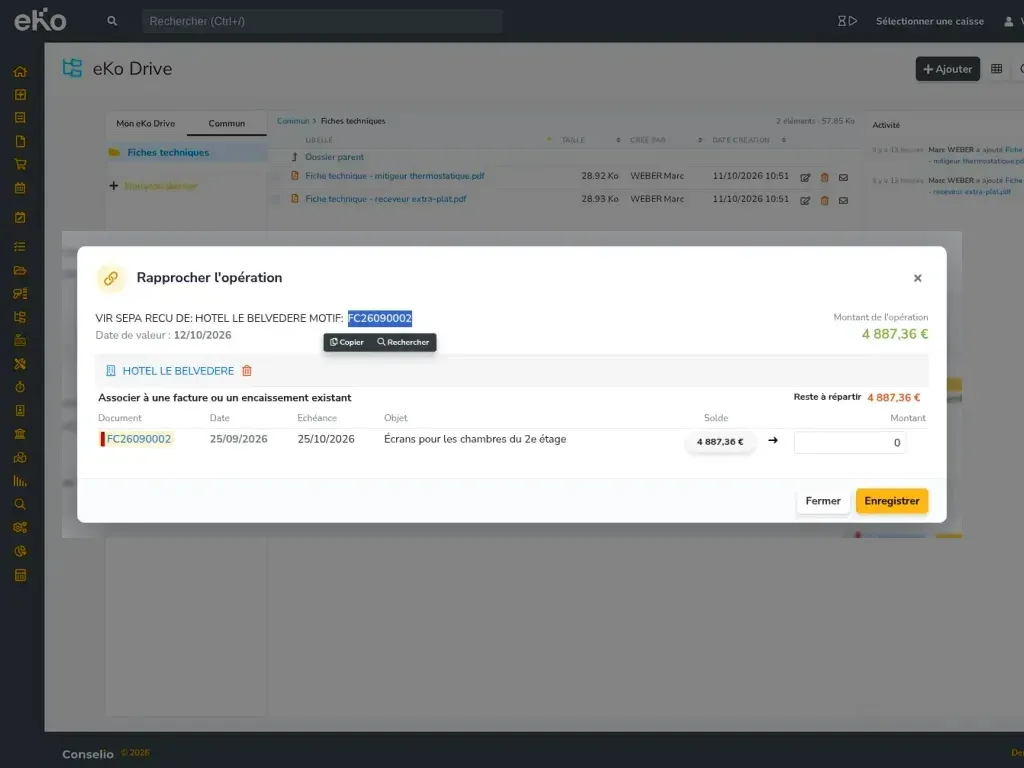
eKo shows your bank account transactions and finds, for each one, the invoice or invoices it settles. You confirm: the payment is recorded and the invoice is marked as paid.
What you can do
Your bank connected to eKo: transactions arrive automatically, with nothing to key in.
eKo recognises the invoice number, the payer or the amount, and suggests the invoices paid.
One transfer paying several invoices? eKo finds the right combination.
eKo suggests, you confirm: no reconciliation is recorded on your behalf.
Create a rule once, and transactions from the same payer are recognised from then on.
In practice
Connect eKo to your bank: transactions come in every day, automatically. If your bank cannot be connected, you key in or import your statements yourself.
For each transaction, eKo looks for the matching invoices: an invoice number quoted in the bank label, a payer recognised by a rule, an exact amount or a combination of several invoices. A suggestion is only pre-ticked when there is no doubt.
You tick the invoice or invoices paid, choose the payment method and confirm. The payment is recorded on the invoice, which is marked as paid: your reminders and your cash position are up to date.
An ideal solution for
Frequently asked questions
Yes, eKo connects to your bank to import transactions every day. If your bank cannot be connected, you can create a manual account and import your statements in CSV format.
eKo automatically suggests the invoices matching each transaction, but you always confirm. Nothing is recorded on your behalf.
Yes. eKo can find several invoices from the same customer whose total matches the transfer amount, and splits the payment between them.