
From your own address
With your mailbox connected (Microsoft 365, Exchange…), customers receive quotes and invoices from your address, with a copy in your sent items.
Emails, texts and calls
Send your quotes and invoices from your own email address, notify customers by text message and keep a record of every call: the whole team finds the history on the customer record.
What you can do
With your mailbox connected (Microsoft 365, Exchange…), customers receive quotes and invoices from your address, with a copy in your sent items.
Reminder emails and text messages start from templates you customise once and for all.
Appointment reminders, order confirmations, payment reminders: messages read within minutes.
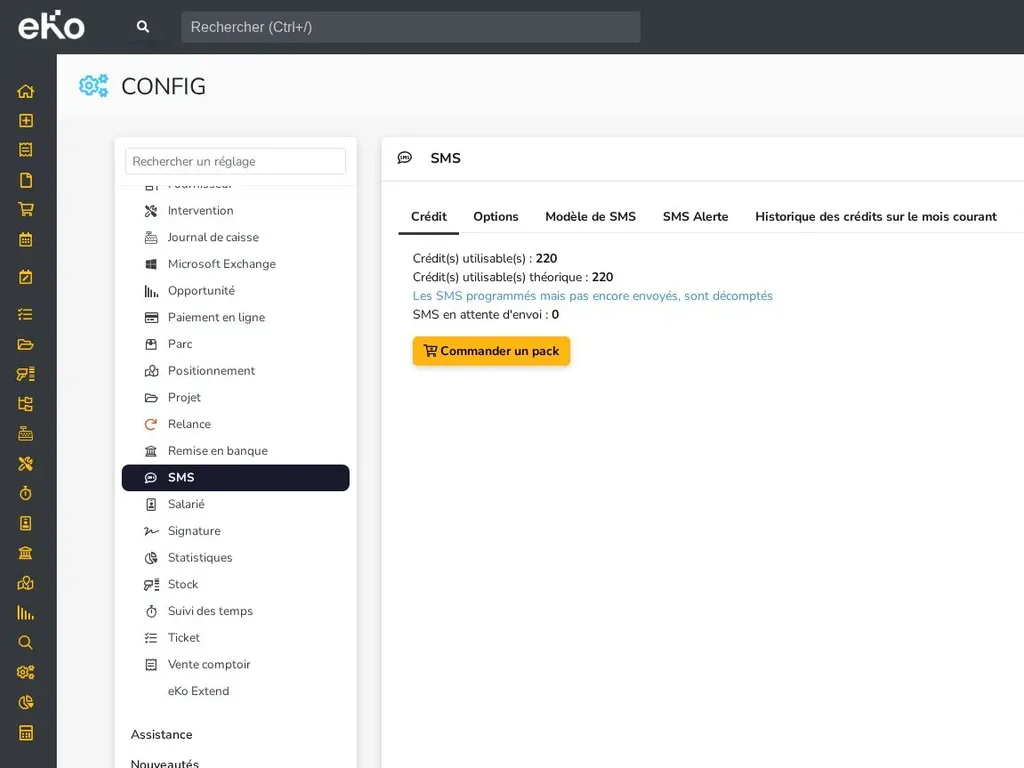
Schedule your text messages in advance and keep an eye on your remaining credit, with packs from 200 to 10,000.
Each call is filed by purpose (prospecting, quote follow-up…), with its outcome and a note.
At the end of a call, the Book meeting button opens the calendar on the customer concerned.
In practice
Connect your mailbox to eKo: your quotes, invoices and reminders are sent from your own address, and a copy is filed in your sent items. Your signature and an automatic blind copy are set up once and for all.
The text message module is for messages that need to be read quickly: an appointment reminder the day before a job, an order confirmation, a payment reminder. Messages can be scheduled, and the remaining credit is shown in the settings.
The Call module keeps a record of every call made to a customer, prospect or supplier: purpose, outcome and notes. Calls appear in the record's history, where the whole team can see them.
Frequently asked questions
Yes, once your mailbox is connected to eKo. Without a configured mailbox, eKo sends your emails from an eKo sending address (no-reply).
The text message module is an option: you choose a pack of 200, 1,000, 5,000 or 10,000 messages and track the remaining credit in eKo.
No. The Call module, available as an option, keeps the purpose of the call, its outcome and your note, visible in the customer record's history.