
Phases
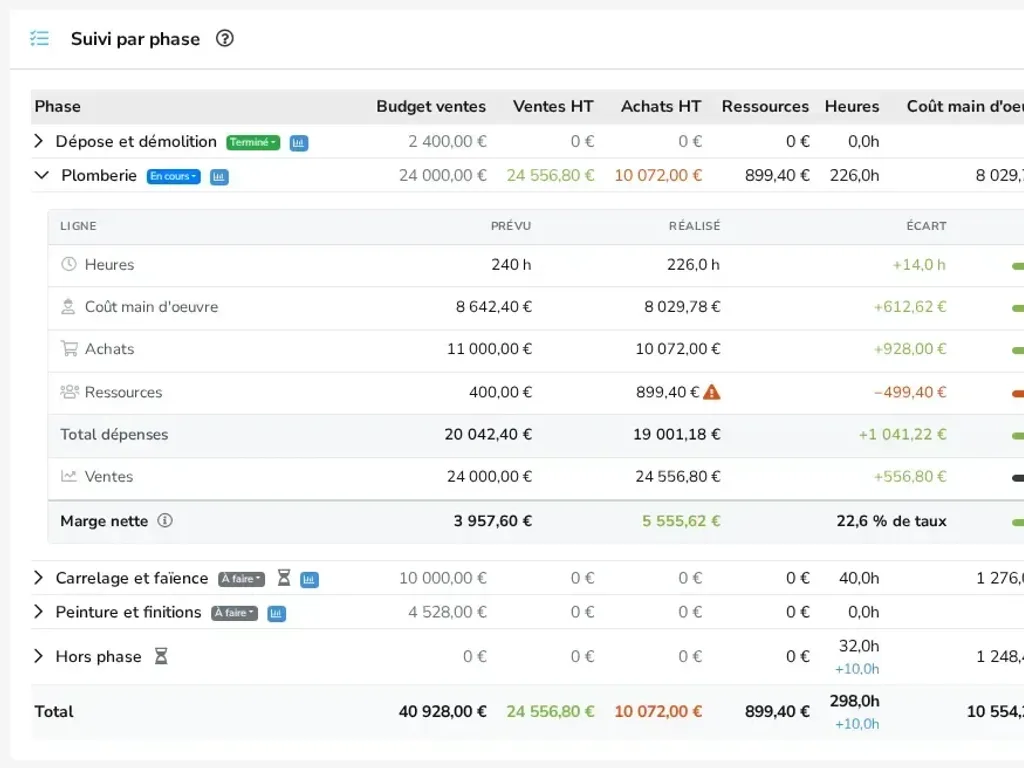
Split the job into stages, each with its dates, status and budget.
Project management
A project brings together everything about one job: quotes, invoices, purchases, materials and hours worked. eKo continuously calculates where the job stands and what it earns.
What you can do
Split the job into stages, each with its dates, status and budget.
Planned hours, purchases, materials and sales, compared with what is actually committed.
What the job makes on purchases, then what it earns once time spent is deducted.
Team hours are linked to the project, with an Excel export at month end.
Quotes, invoices, supplier orders and invoices linked to the project and its phases.
In practice
The project is created from the customer record. You give it a forecast budget (hours, purchases, materials, sales) and, if needed, phases: survey, procurement, installation…
Every quote, invoice, supplier order, material issue or hour worked can be linked to the project and one of its phases. eKo continuously shows the amount quoted, invoiced, still to collect and the purchases committed.
Two margins answer two questions: gross margin tells you whether you bought and sold well; net margin, once labour is deducted, tells you what the job really earns. A wide gap points to a job that is taking too much time.
An ideal solution for
Frequently asked questions
Gross margin is the amount invoiced minus supplier purchases and materials used. Net margin also deducts the cost of the labour spent on the project.
Yes, a project can be split into phases, each with its own dates, status and budget. Documents, hours and materials can be linked to a phase.
eKo exports the hours entered in the team's calendars to an Excel file, with a summary by project and by person.