
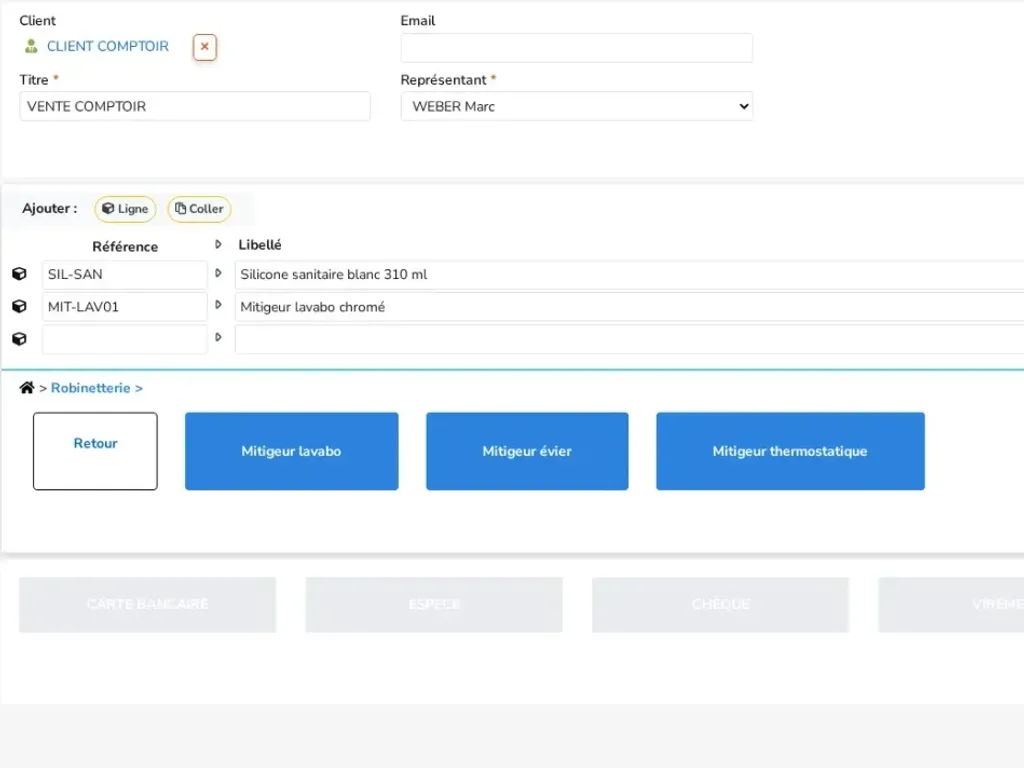
Items as tiles
Your favourite items appear as tiles, sorted into folders, so you can sell in a few taps.
Counter sales
In store, at a trade fair or at reception, take payment from your customer without going through the quote, order, invoice process. eKo creates the confirmed, paid invoice, ready to print or send.
What you can do
Your favourite items appear as tiles, sorted into folders, so you can sell in a few taps.
Cash, card, cheque: take payment for a sale in one or several payments.
The invoice is created, confirmed and marked as paid as soon as the sale ends.
Print a till receipt or an A4 invoice, or email it to the customer.
Opened with a cash float, with payments recorded in the cash book automatically.
In practice
On the counter sales screen, you pick items with the keyboard or by tapping the tiles of your favourite products. Prices are shown excluding or including VAT, depending on how you work.
Walk-in customers are already selected through a "counter customer" record; for a known customer, just choose their record. You take payment in one or several payments, and the sale is recorded in your cash book.
eKo immediately creates the confirmed, paid invoice. You print it as a receipt or on A4, or send it by email: it joins your invoices and your accounting export, like all the others.
An ideal solution for
Frequently asked questions
No. eKo counter sales takes payment from the customer, records it in the cash book and creates the invoice, in the same tool as your quotes and invoices.
Yes. A counter sale invoice can be printed as a receipt or on A4, or emailed to the customer.
Yes, a sale can be settled with several payment methods, for example part in cash and the rest by card.