
New: discover the Timer module in eKo!
Get a clear view of your working time for each task or client with eKo's time-tracking module.

We are always listening to your needs to improve eKo, and following a request from one of our customers, we have developed a new feature! We are delighted to introduce: the timer!
Why might you like this feature?
The idea for the Timer came from a customer who was looking for a simple way to track the time spent on each client task, and therefore to know how profitable each of her files was.
We quickly realised that this tool could benefit a wide range of professionals in many lines of work: consultants, sales representatives, project managers, developers, HR, outsourced secretaries, lawyers, consultancy firms… Anyone who has to manage tasks with precise deadlines and track their time. The Timer module lets you start and stop a stopwatch for each task in one click. You will know exactly how much time you have spent on each activity and for each client. This precise tracking helps you manage your schedule better, optimise your tasks and, if necessary, justify your services.
A tool for all professionals
Here are the main benefits of the time-tracking module:
- Precise time tracking: Get a clear view of your working time for each task or client.
- Improved productivity: With an overview, you can prioritise your actions better and be more efficient.
- Transparency for your clients: Bill by the hour or easily justify the time spent on specific assignments.
- Ease of use: The timer is seamlessly integrated into the eKo interface and is easy for every user.
- Excel export: Lets you produce statistics and correct entries manually if there is a mistake.
How does it work?
Step 1
Already an eKo customer? Contact your account manager to activate the option on your eKo account (switchboard number FR: +33 9 72 11 76 05, LU +352 26 551 109).
Not a customer yet? Book a demo!
Step 2
Log in to eKo with your username and password (you can use your computer or the device of your choice: tablet, phone…).
Step 3
Do you have an assignment for one of your clients? Go to your client's record, then click the Timer button at the top right .
Step 4
Fill in the required information: Tracking type, Client concerned, Note, then click Start. See the screenshot below.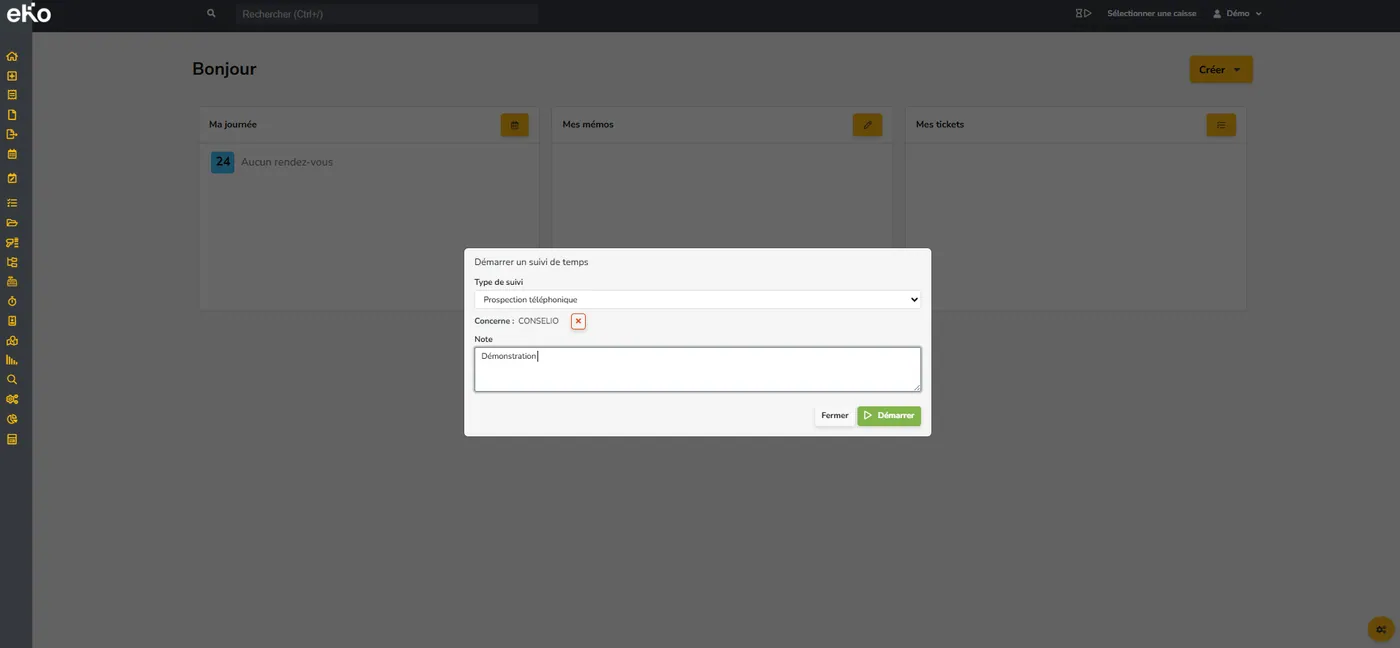
Step 5
The timer starts.  You can see it at the top of the page. To stop the timer, click on it. You can change the time, add or subtract 5 minutes, and change the tracking type and the note. To stop the timer, click Stop.
Step 6
To see the full history, go to "Time tracking" by clicking the corresponding icon on the left. A summary table is available.
You can edit or delete rows, filter by user (member of your team), filter by date, and export everything to Excel (Export button at the top right).
Conclusion
eKo's new time-tracking module is a useful tool whatever your sector. It helps you organise your tasks better, improve your productivity and offer more transparency to your clients. Try it now! Book a demo.