
How to add a new supplier in eKo
With our CRM, optimise the management of your supplier and customer relationships to boost productivity and foster lasting partnerships.

In eKo, you can have a complete, unified view of your suppliers. Centralise crucial information, track transactions and strengthen collaboration with your suppliers for optimal procurement management and a rewarding business relationship.
Here are the steps to add a new supplier to your contact database:
1. Log in to eKo with your username and password (from your computer or the device of your choice: tablet, phone...).
2. On the left of your dashboard, click the + Add > Supplier icon.
Two options are available to you:
Option 1: Search for your supplier's company in the search bar that opens on the right. It lists all French companies and lets you fill in the supplier record more quickly. You can search by company name, SIREN or SIRET number (French company identifiers) or town.
Option 2: Enter the information manually. To do this, click the cross at the top right next to "Company search".
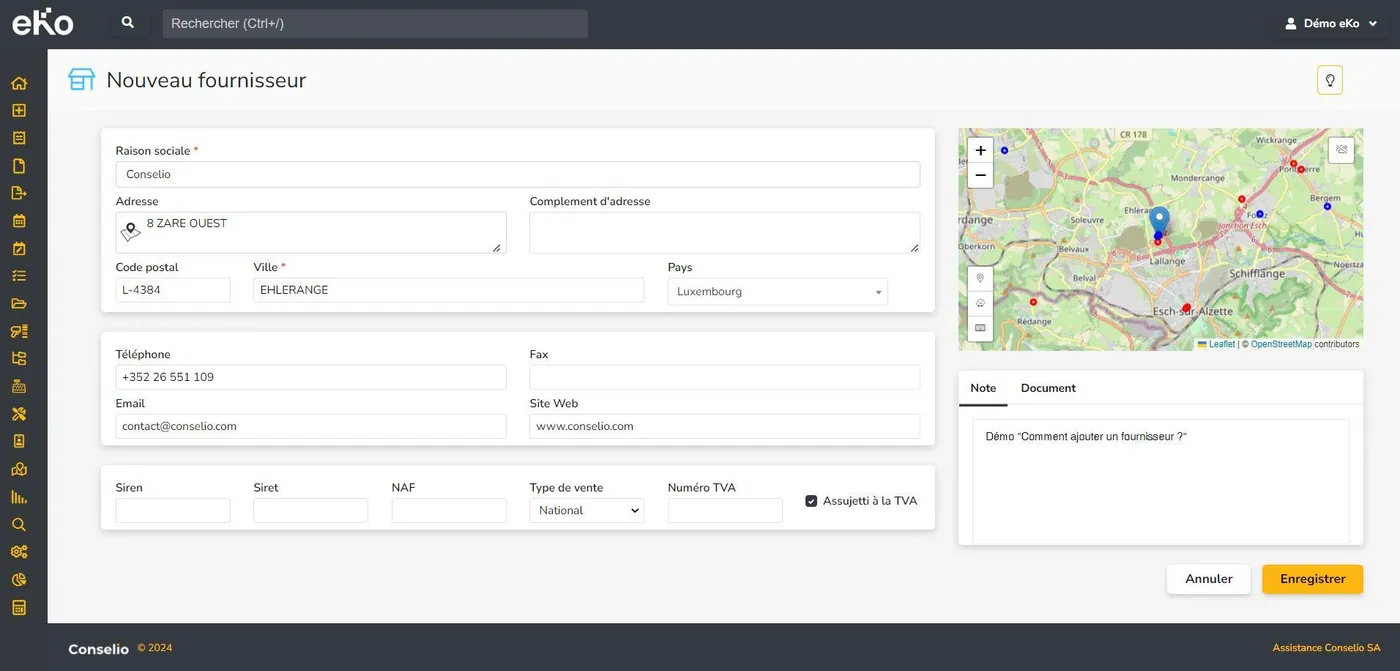
Fill in all the following fields: company name, address, postcode, town, country, telephone, fax, email, website, SIREN, SIRET, NAF code (French business activity code), type of sale, VAT number (if registered), account number, comments and documents.
3. Finally, to save, click the "Save" button.
Curious to discover all of eKo's features? This way!