
How to create a quote in eKo
Simplify the quote creation process with eKo. Design professional quotes in just a few clicks.

Simplify the quote creation process with eKo CRM. Thanks to an intuitive interface, designing quotes becomes child's play. Quickly put together professional proposals, customise them to your customers' specific needs, and save time to focus on the core of your business.
Here are the steps to follow to create a quote:
1. Log in to eKo with your username and password (from your computer or the device of your choice: tablet, phone...).
2. Go to your customer's record, then click the yellow Create > Quote button at the top right.
3. Several options are available to you:
- Create the quote from another document: you can choose to reuse the contents of another quote.
- Create a blank quote: you can create the quote from scratch.
- Create the quote from a list: you can create the quote from a listing in the form of text to copy and paste.
4. In this example, we have chosen the blank quote option.
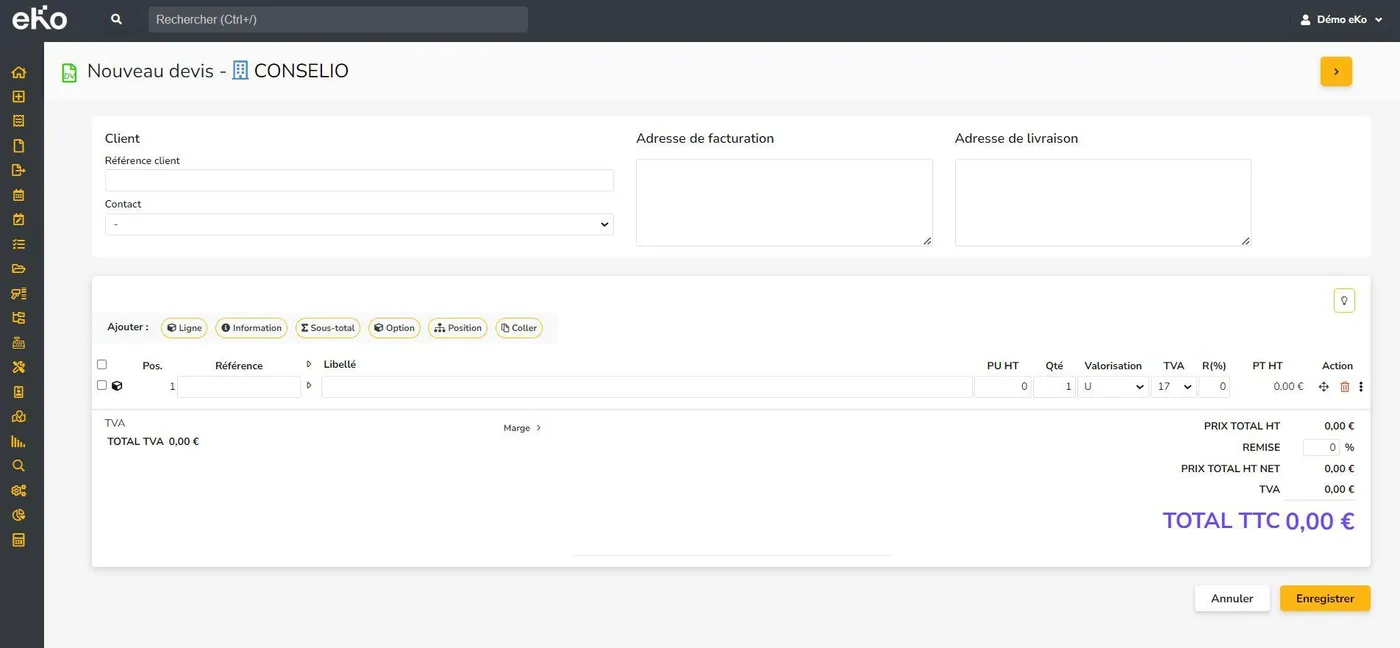
Fill in all the fields: quote title, sales representative, customer name,... Note: you will notice that several fields are already filled in to make your work easier; you can change them if needed.
Add the lines of your quote (products/services are pulled from your item database: just search for them by typing a few letters or the first digits of your item reference). Adding a new line couldn't be simpler: just press the "Enter" key on your keyboard. You can change the prices. Just press the Enter key to move to the next line.
3. Finally, to save, click the "Save" button.
Curious to discover all of eKo's features? This way!